
A standard WordPress installation comes with a set of database tables. Each one has a specific job, like storing articles, pages, settings, users, or comments.
Understanding how WordPress stores its data isn’t just “nice to know”, it makes everything about running a site easier. When beginners learn how the database tables are organised, troubleshooting stops feeling like guesswork. They can see where posts, pages, and settings actually live, which builds confidence fast.
For administrators, this knowledge turns technical issues into manageable tasks instead of mysteries. And for freelancers or developers, it becomes the foundation for reliable debugging, smoother migrations, and cleaner problem‑solving.
In short: knowing your way around the WordPress database helps everyone, no matter their experience level.
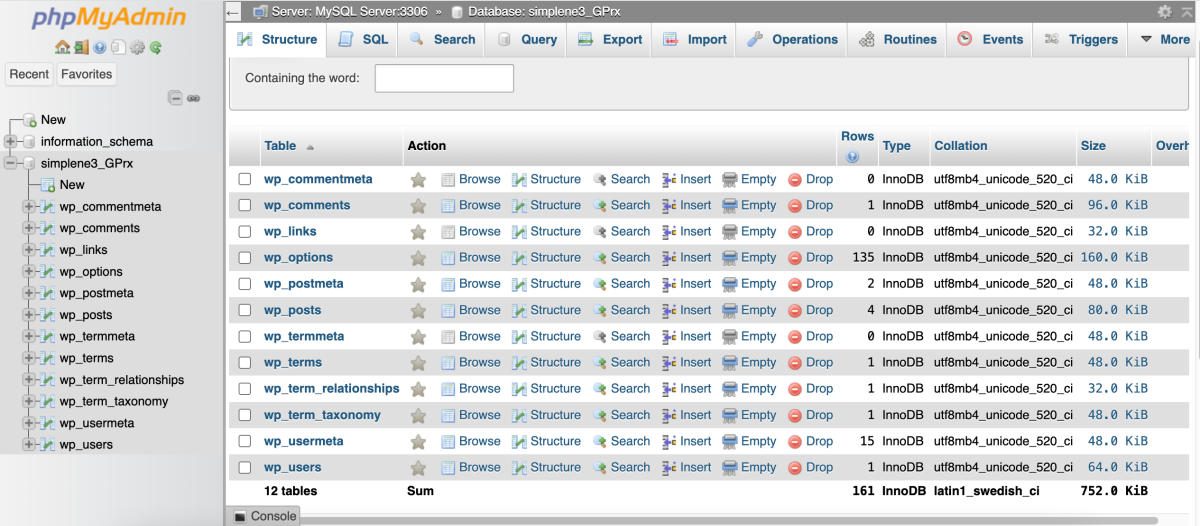
WordPress database table descriptions
When you set up WordPress, it creates 12 tables, usually starting with wp_. This wp_ prefix is the default, but you can change it during installation.
wp_commentmeta
This table stores extra comment details. It includes keys and values for plugin data.
wp_comments
All site comments live here. The table includes author names, emails, IP addresses, and comment text.
wp_links
Older versions of WordPress used this table for blogrolls. Some plugins still use it for link management.
wp_options
This table is essential for site configuration. It stores the site URL, admin email, and time zone. Themes and plugins save their settings here.
wp_postmeta
Metadata for posts and pages resides here. It includes page templates, custom fields, and SEO data.
wp_posts
This table holds most content. It includes pages, revisions, menus, and media files.
wp_termmeta
Taxonomy terms have metadata here. Plugins use it for category information or product attributes.
wp_terms
This table contains the actual names of categories and tags.
wp_term_relationships
This table links content to terms. It shows which article belongs to a specific category.
wp_term_taxonomy
This table defines the taxonomy type. It identifies if a term is a category or a tag.
wp_usermeta
Extra user data is stored here. It includes preferences, permissions, and plugin settings.
wp_users
The main table for user accounts. It contains usernames, encrypted passwords, and emails.
In conclusion
Understanding the WordPress database isn’t about becoming a database expert, it’s about knowing your site’s backbone.
Once you recognise what each table does and where key data lives, everything from debugging to migrations becomes far less intimidating.
The more familiar you are with the structure, the more confidently you can manage, fix, and grow any WordPress site.
