
We would like to inform you that PHP 8.5 is now implemented and ready to use on our WordPress hosting packages.
This update represents a natural step towards maintaining a modern and secure hosting environment for our clients’ projects.
How to change the PHP version
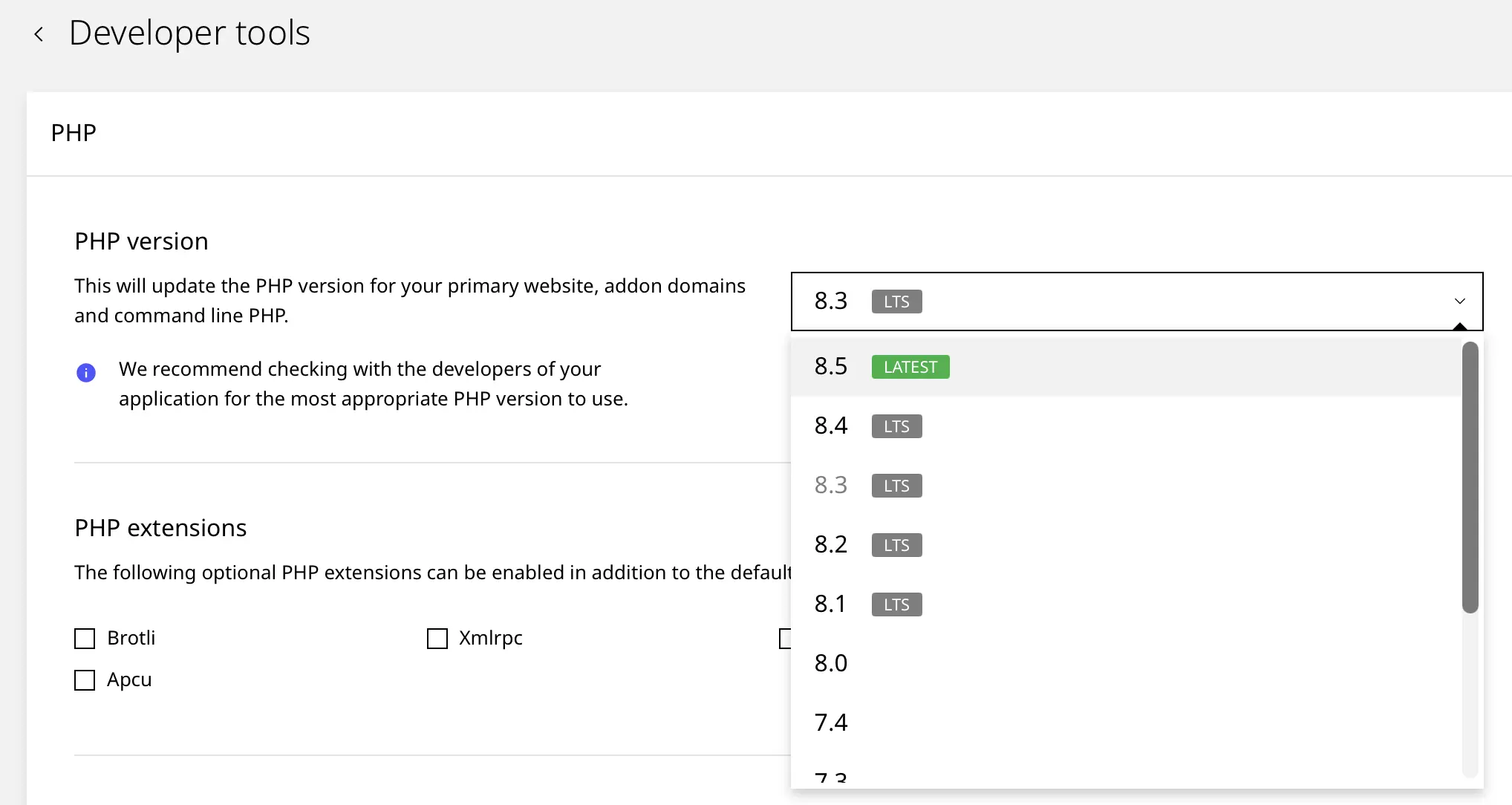
Updating to PHP 8.5 is done through your hosting control panel. The process is designed to be quick and intuitive.
- Access your hosting control panel.
- Click on the desired website.
- Navigate to the Advanced > Developer Tools section.
- Select PHP 8.5 from the list and press the Update button.
For a complete guide that ensures a smooth transition, we have prepared a detailed tutorial on changing the PHP version.
What PHP 8.5 brings
While performance improvements do exist, they are not spectacular. Most enhancements are primarily benefits for developers. They are presented in more detail on the official release page.
In short, these are:
- Simpler array functions, such as
array_first()andarray_last(), simplify data manipulation within arrays. - The Pipe Operator
|>and theclone withmodification syntax allow for writing more readable and logical code. - The URI extension parses and modifies links according to standard rules, preventing security errors when handling web addresses.
- The
#[\NoDiscard]attribute notifies you if you forget to use the result of an important function, reducing coding mistakes. - Persistent handles reuse connections between requests without reinitializing them every time, saving time.
- The
#[\Override]attribute on properties verifies correct overrides, and static closures work in constants for cleaner code. - Fatal errors now display the full stack trace, helping quickly locate issues in large applications.
Thus, while the end-user will notice a small difference in speed, developers now have the necessary tools to write better code, which translates into the long-term stability and maintainability of the WordPress platform.
PHP 8.5 compatibility with the WordPress ecosystem
Any major software version change requires a cautious approach. Please pay attention to the point below before moving to PHP 8.5.
Not all themes and plugins, especially older ones or those not recently updated, are fully compatible with PHP 8.5. Using a version that is too new may lead to site functionality errors.
For example, currently, the Imagick and Ioncube modules are not supported on PHP 8.5, pending the release of new versions by the providers of these modules.
Aspects to verify before updating
If you wish to switch to PHP 8.5, we recommend the following verification process.
Perform a backup
Before you begin, ensure you have a complete backup. Should a problem occur, you will be able to revert quickly to the previous version.
You can follow our detailed video tutorial on how to perform a manual backup from our control panel.
WordPress, themes, and plugin updates
Before changing the PHP version, we recommend updating your main theme and all plugins to the latest available versions.
Test on a staging site
Our WordPress hosting includes a testing environment (staging). You can clone your live site to a staging site and change the PHP version there.
This allows you to test the functionality without affecting the public site.
In case you observe errors after the update, the fastest solution is to temporarily revert to the PHP version you used previously.
As always, we are here to offer the necessary support. If you encounter difficulties or have questions, please contact us.

Leave a Reply