A website owner approached us after his site was compromised and filled with over 6,000 gambling articles. Despite repeated deletions, the malware continually restored the spam content.
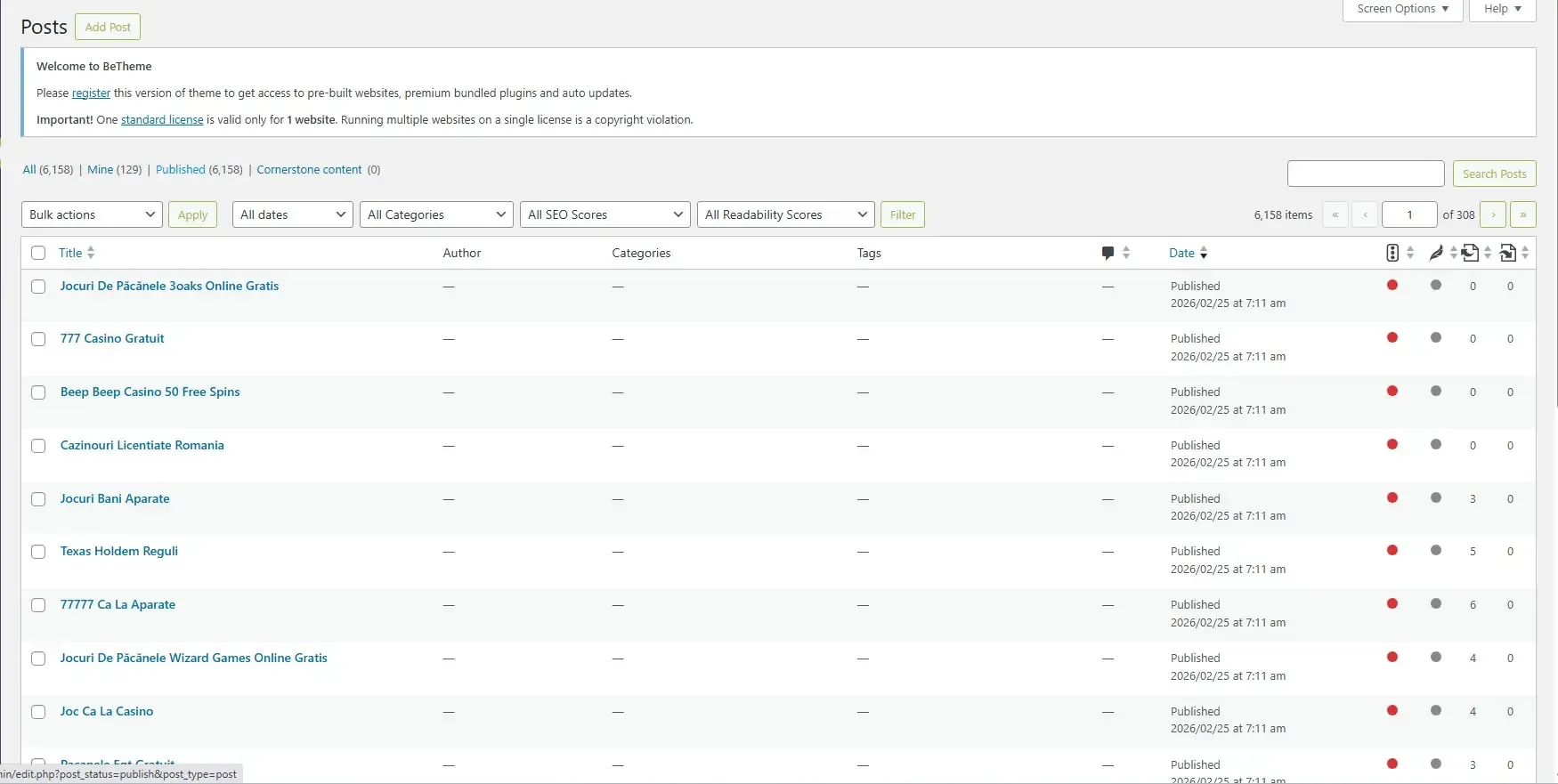
We migrated the site to Kiravo, where our annual plan includes a security audit and virus scan.
The audit began with the raw cPanel backup provided by the client, which revealed one of the most extensive infections we have encountered this year.
We will walk through the infrastructure the threat actor built: the order they deployed it in, how the components talk to each other, and what each one was for. Along the way you’ll find practical steps to protect your own WordPress site from threats like this.
The damage was contained inside the WordPress directories. The cPanel infrastructure folders (mail/, .cpanel/, ssl/) were not compromised.
What the attackers built
Before detailing each layer, here is a summary.
The actor planted a content-generation engine, a routing layer that pointed search-engine traffic at the generated content, a self-healing webshell to maintain access, and a stack of fail-safes to ensure the infection survived the deletion of individual files.
The purpose of the 6,000+ gambling posts was to generate Google traffic and monetize it through redirects to affiliate spam sites.
Several distinct payloads worked together to make that happen, each detailed below.
The timeline of the attack
This is the operational sequence we reconstructed from file mtimes, code structure, and how the components reference each other. Some dates are approximate because the backup only preserves the latest mtime, not the full edit history.
Initial entry
The earliest dormant artifacts in the backup go back to November 2024 (an empty php-console-2 stub). The first “real” payloads carry February 2026 timestamps.
Disk forensics alone did not confirm the original entry vector. The attacker family that drops these specific payloads typically enters via outdated, vulnerable plugins (LayerSlider, RevSlider, and file-manager-style plugins are the classics) or stolen admin credentials.
The presence of a legitimate wp-file-manager plugin in 13 locations across the account, with several known unauthenticated RCE CVEs in its history, remains a plausible candidate.
Building the spam engine
Once inside, the actor went for revenue before persistence, so the operation started paying off right away. They uploaded a fake “Yoast Helper” plugin (smush-508) that mass-published the spam posts from bundled TXT and CSV files, planted the “Balu” injection in six theme functions.php files to cloak the spam and redirect visitors, and stashed a clean copy of each original functions.php as a rollback fail-safe in case their own injection broke the site.
Building C2 and redundant entry points
Next came the remote-control layer. Two custom database tables (wp_pcachewpr and wp_lcachewpr) held the command-and-control endpoints and the URL routing maps that bound each fake post to its cloaked content. 28 hex-named droppers were sprayed across wp-content/ as disposable code-execution fallbacks in case the other backdoors were cleaned up. And the woocommerce_TAG plugin caught visitors arriving from search engines and bounced them to affiliate spam.
Persistence and admin stealth
With money flowing, the actor locked in long-term access. Two obfuscated mu-plugin backdoors auto-loaded on every request and couldn’t be deactivated from the admin UI. The wp-system-cache plugin hid both itself and a secret administrator account, and two legitimate developer tools (wp-console and several php-console variants) were repurposed as in-browser webshells. The actor also rewrote robots.txt across the network to block SEO and security crawlers while pointing Google straight at malicious sitemaps for the casino, crypto, and pharmacy pages.
The final lock-in
The last and most sophisticated component was injected around April 29, 2026: a self-healing webshell wired into wp-config.php. A repair handler rebuilds a hidden file manager whenever the site hits a fatal error, then locks the files down so they can’t easily be deleted. The full mechanics are spelled out under “A self-healing cache handler” below.
Marking the territory
Finally, the actor dropped empty bot-coordination markers (config-main.php, 1.php, and similar) in one subdomain’s root. Other automated scripts in the same family check for these before running, so they don’t waste effort re-infecting a site this group already owns.
The malware components
The timeline above is the chronology. This section is the reference: every component in full, organized by function.
A self-healing cache handler
This is the wp-config.php injection, fenced off by the comment /* WP_CACHE_INTEGRITY_MARKER */. It defines wp_cache_repair_handler(), which decodes a long base64 blob and writes it to three hidden locations:
wp-includes/.wp-cache-handler.php
wp-content/.wp-temp-data.php
wp-content/uploads/.cache/.wp-session-backup.php
The decoded payload is a class called FM_Standalone: hold the right token and you get a browser-based file manager (list, upload, download, edit, rename, chmod, mkdir, touch, delete, and shell_exec) styled to look like a developer tool. A RewriteRule in .htaccess routes any URL carrying ?wp_cache_token=<token> straight to the handler:
<IfModule mod_rewrite.c>
RewriteEngine On
RewriteCond %{QUERY_STRING} (wp_cache_token|wp_token)= [NC]
RewriteRule .* wp-includes/.wp-cache-handler.php [L]
</IfModule>
The injection also calls register_shutdown_function(), so any fatal PHP error re-triggers wp_cache_repair_handler() and re-creates the three drops if they’re missing. Each drop is chmod-ed 0444 and its parent directory 0555, so even with the file manager you can’t delete the drops without first escalating permissions. The shutdown hook plus the permission locking are what make this layer self-healing.
To remove it cleanly: excise the wp-config.php block from the marker comment through the end of the register_shutdown_function(...) call, strip the .htaccess rewrite block, then chmod u+w the parent directories before deleting the three drop files. Once the repair function is gone, the drops stay gone.
8-character hex droppers
28 files matching [a-f0-9]{8}.php, scattered across wp-content/ on every site. Sample paths:
/wp-content/57cc122f.php
/wp-content/uploads/fef52e38.php
/wp-content/uploads/2a591b72.php
/wp-content/plugins/LayerSlider/4dad4931.php
/wp-content/uploads/e421bb14.php
/wp-content/plugins/astra-sites/7e67294f.php
Each one uses split-string obfuscation to keep dangerous function names out of plain text:
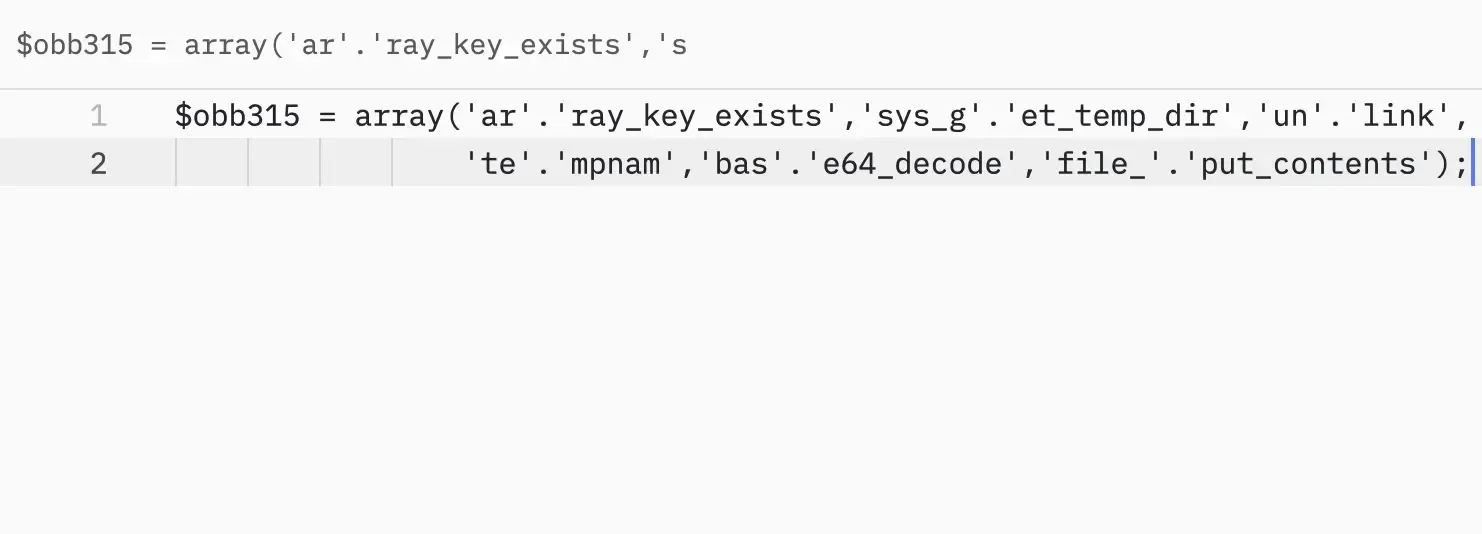
These are stateless code executors. Send a base64-encoded PHP payload as $_POST['319d3823'] (or the GET equivalent), and the dropper decodes it, writes <?php plus the payload to a tempnam in the system temp directory, include_once()s it, and immediately unlink()s the temp file. The dropper itself contains no eval or system call, so signature-based scanners often miss it. Full code execution, no persistent footprint of what was actually run.
A single find . -type f -name "[a-f0-9][a-f0-9][a-f0-9][a-f0-9][a-f0-9][a-f0-9][a-f0-9][a-f0-9].php" finds them all on a compromised site of this family. Verify the matches before bulk-deleting on accounts where you’re less sure.
A theme functions.php injection
Six theme functions.php files had a payload sandwiched between two identical MD5 marker comments:
/themes/betheme/functions.php /* 7fb5cc8fcbfb7ec15164f8453d98c308 */
/themes/twentytwentyfour/functions.php /* 8ef89a2c935520f8385a4c56233137cb */
/themes/twentyseventeen/functions.php /* 1f914a54ec0902be962df8fff5928648 */
/themes/kids-campus/functions.php /* 15eb60cb816e27da92bfac0fc695e90b */
Inside the markers, the code pulls two payloads out of wp_options:
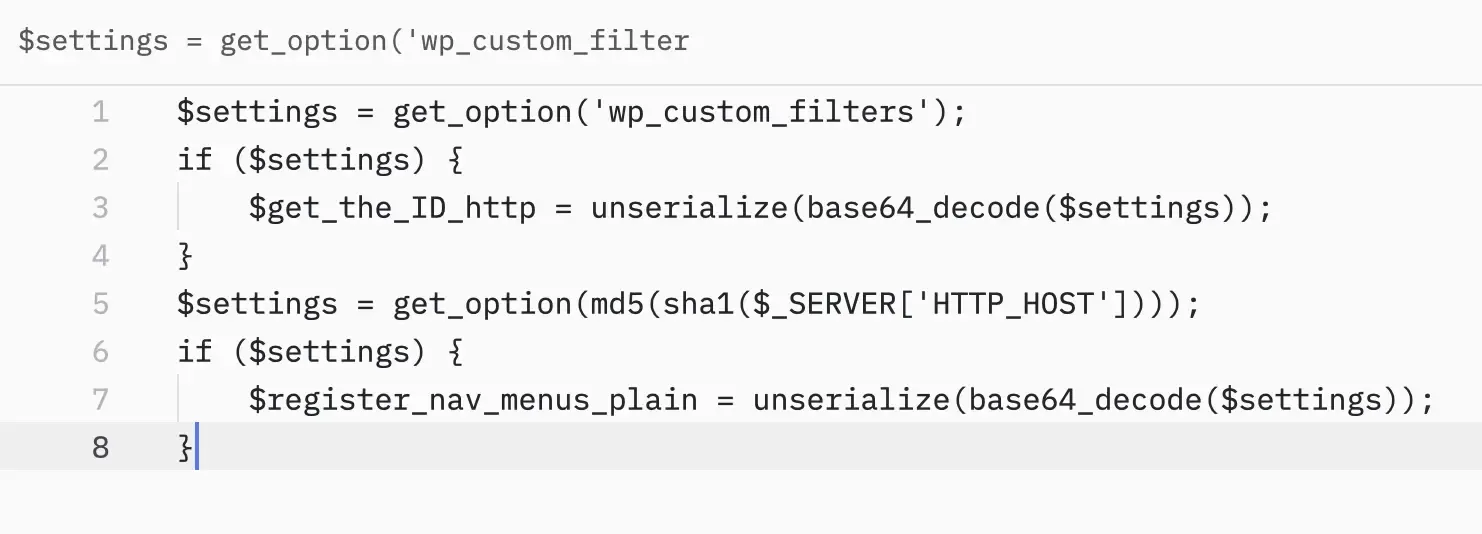
The unserialized blobs are keyed by post author ID. When a logged-out visitor hits a single-post URL, the malware matches the URL against per-author rewrite rules, then either injects malicious JavaScript via wp_head / wp_footer or fires a template_redirect. Filters such as posts_where_paged, pre_get_posts, and rewrite_rules_array are used to hide spam content from logged-in admins.
Cleanup is a two-step process. The PHP between the markers gets surgically removed (a small script that finds the opening marker and its closing twin works on all six files). The two wp_options rows that fed it (wp_custom_filters and the per-host MD5) are inert without the PHP, but should still be deleted from every site’s database.
The eefw_* function family (eefw_home_hosts, eefw_allowed_hosts, eefw_url_allowed) is the same actor’s signature, found both inside the smush-508 plugin and as a “security shim” pasted into Betheme’s functions.php between // eefw-security-508-start and // eefw-security-508-end markers: same operator, same toolkit.
Database C2 and routing tables
This is where the spam URL routing lives.
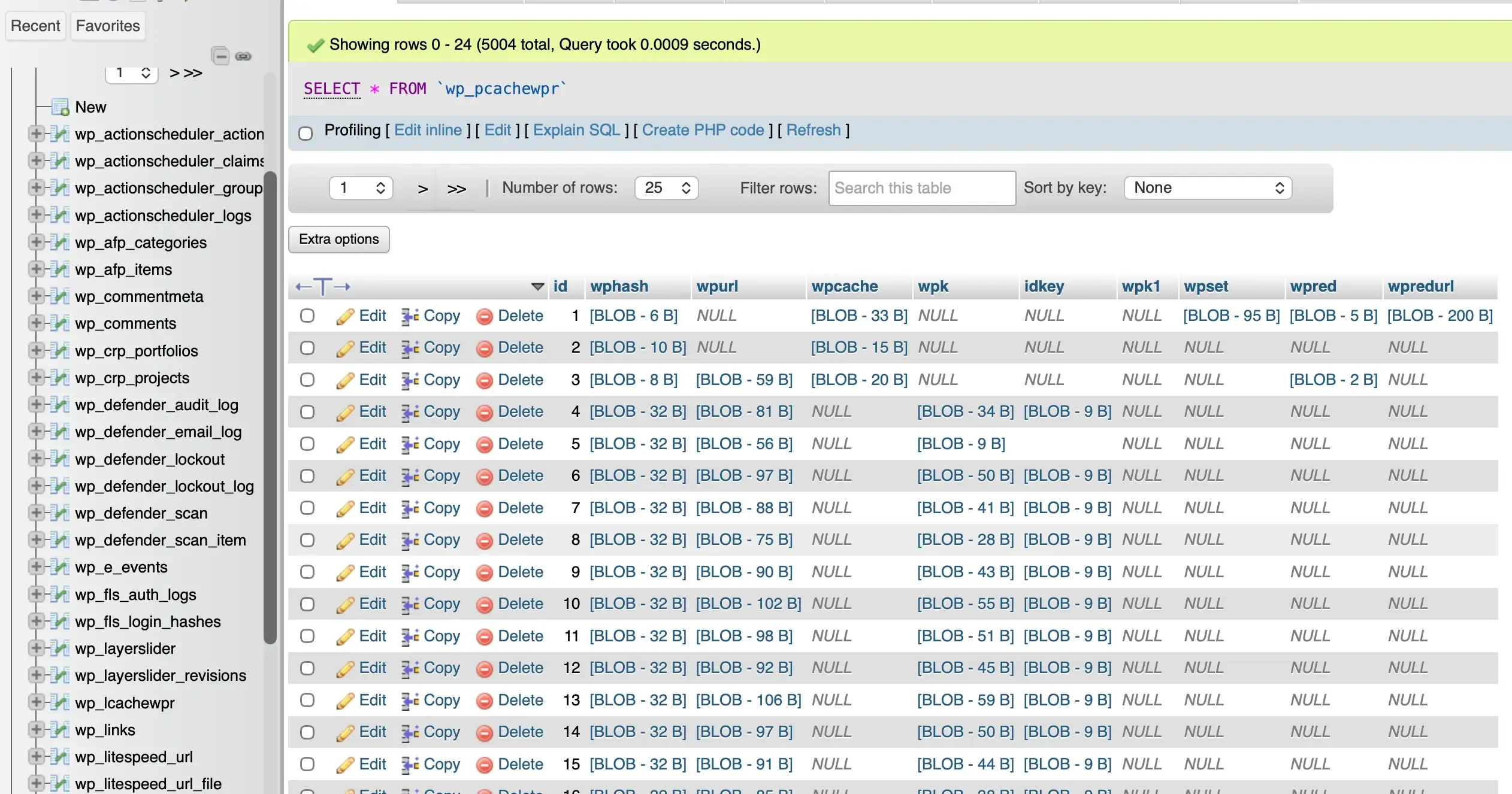
Two custom tables, wp_pcachewpr and wp_lcachewpr, hold hex-encoded BLOBs. Decoded, they contain:
- The C2 endpoints the malware polls for instructions.
- The configuration arrays describing how many spam links to inject per page.
- The exact URL routing maps that bind each fake post slug to its cloaked content.
Storing routing data in custom database tables (instead of wp_options) evades generic database scanners that only check wp_options, wp_postmeta, and wp_posts. Hex encoding the BLOBs adds another layer of evasion.
These tables need to be DROP-ed during cleanup. The SQL is under “How we cleaned and restored the site” below.
robots.txt and malicious sitemaps
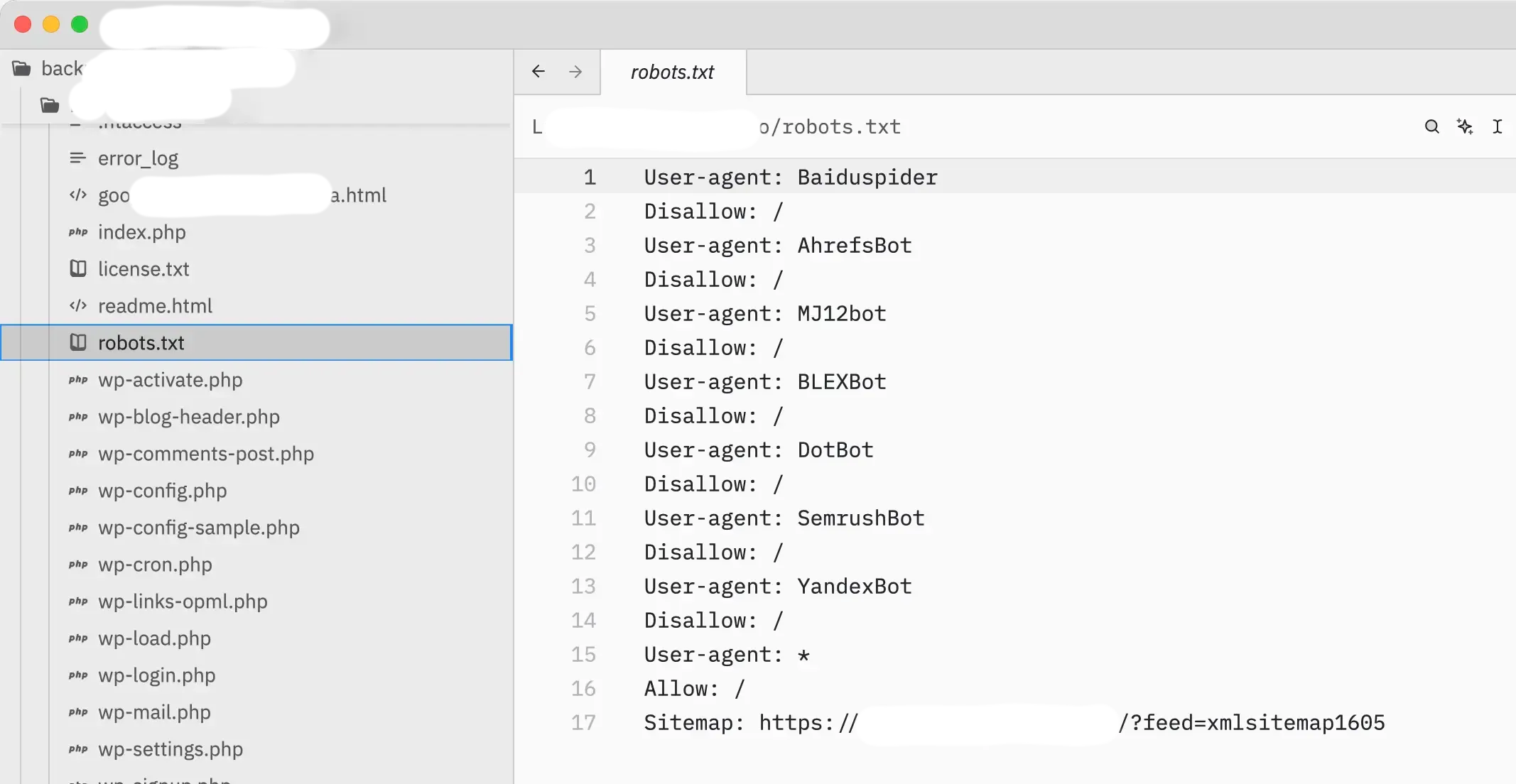
Across the network, robots.txt was rewritten with the changes buried under hundreds of blank lines. The actor added Disallow: / rules aimed at SEO and security crawlers (AhrefsBot, MJ12bot, SemrushBot, DotBot) so external scanners wouldn’t surface the spam links, then added custom Sitemap: directives pointing at malicious XML maps like /.wp-toolkit_E/live-casino/sitemap.xml and /gambling-board/sitemap.xml. Those sitemaps told Google exactly where to find the 6,000+ casino, crypto, and pharmacy pages.
Stealth plugins
Three plugins, each designed to remain invisible to the site owner.
woocommerce_TAG
It is unrelated to WooCommerce. The “WooCommerce” prefix is social engineering: site owners avoid touching anything WooCommerce-named for fear of breaking their store.
Hooks template_redirect, checks for a search-engine referrer, and redirects first-time visitors. Hides itself from the Plugins page. Strips the Deactivate link. Uses a 24-hour cookie to prevent visitors from being redirected twice and to avoid suspicion. (If your own visitors are hitting unexpected redirects, our walkthrough covers how to fix a redirecting WordPress site.)
wp-system-cache
Identifies itself as “WP Cache Performance” by “WordPress.” Standard self-hiding via unset($plugins[plugin_basename(__FILE__)]).
The interesting part is what else it hides: it filters pre_user_query, views_users, and the REST users endpoint to remove a specific admin account (controlled by the _wpc_cx option, defaulting to wp_ + CRC32 hash) from every list, and it bypasses Force Login on the REST API. The plugin hides both itself and the attacker’s administrator account.
smush-508
Identifies itself as “Yoast Helper” by “Team Yoast,” though it has nothing to do with the real Yoast SEO plugin; the name is camouflage. Same self-hiding trick. Also hosts the spam-post generation engine: an admin_init action reads TXT files from a posts/ subdirectory and a CSV at wp-content/uploads/2024/11/508.csv, then calls wp_insert_post to publish them in bulk. This is the source of the 6,000+ posts the client saw.
The mu-plugin backdoors
Two of them:
mu-plugins/direct-connector-mod.php
"Smart Toolkit Live" by "Digital Works Studio"
mu-plugins/core-plugin-bit.php
"Primary Dispatcher Kit" by "Rachel Mitchell"
direct-connector-mod.php was present in 10 locations. core-plugin-bit.php in 3.
Both files use the same obfuscation pattern: hundreds of variables each holding a short base64 fragment, padded with throwaway characters as decoy noise, then reassembled at runtime into function names. Once decoded, the scripts dial remote C2 hosts, poll for instructions, write new files, and modify the database.
The plugin headers are camouflage. There is no plugin called “Smart Toolkit Live” on wordpress.org. There is no developer “Digital Works Studio” with that author URI. The header is there so anyone glancing at the file thinks it’s a legitimate dependency.
Legitimate plugins used as attack tools
Two real plugins were repurposed as backdoors.
wp-console
This is a legitimate plugin by Edi Amin that ships an in-browser PsySH PHP REPL inside the WordPress admin. On a clean site, it’s a developer convenience. On a compromised site, it’s effectively a webshell with a clean plugin header. Installing WP Console is a common second move after an attacker secures admin credentials, as the resulting backdoor leaves no obvious malicious file footprint.
We found it in two subdomains, plus three empty stub directories (php-console-actual, php-console-2, and php-console-mu-4.3) elsewhere.
wp-file-manager
This plugin existed in 13 places. It’s a legitimate plugin that has had multiple unauthenticated RCE CVEs over the years. Even patched, it exposes a free file manager to anyone with admin rights.
We asked the client if he installed these plugins, and when he said no, we removed them everywhere.
Leftovers
Once the active payloads were gone, a final sweep turned up vestigial pieces:
- wp-promtools-pro/functions_bak.php in four subdomains. Clean copies of the original functions.php files, kept as fail-safes so the malware injector could roll back if its own changes broke the site.
- Empty plugin shells with names lifted from real WordPress products (wp-core-*-module, wp-engine-*-module, wp-kernel-module, zend-fonts-wp, opt_v13od7) sitting in .wp-toolkit_E/ and the cPanel .trash/ folder. A prior partial cleanup had deleted some of these, but they were still recoverable.
- custom-socializer-tracking-post, a “monitoring plugin” in /wp-content/plugins/ that exfiltrates site data to an attacker-controlled MongoDB instance. Russian-language comments in the source.
- Fake plugin folders with names that look legitimate at a glance: contact-form-7-pro (no such plugin officially exists), all-in-one-seo-pack-stable, and wordpress-seo-extended (a known fake Yoast SEO clone used by this actor family).
- Bot coordination markers in one subdomain’s root folder: config-main.php, config-main_2506.php, and 1.php. Used by the actor’s automated scripts to recognize “we already own this site.”
- A 0-byte index-encryption.php in one plugin directory.
- Approximately 250 empty directories remained from old plugin upgrades, .wp-toolkit_* staging, and upload folders. We have cleared them all.
How we cleaned and restored the site
Inside the backup archive, we worked through the files first:
Sanitized core files
Removed the self-healing base64 injection block from wp-config.php and the malicious mod_rewrite block from .htaccess.
Destroyed the webshell drops
Force-deleted .wp-cache-handler.php, .wp-temp-data.php, and .wp-session-backup.php after relaxing parent-directory permissions.
Purged the micro-droppers
A global sweep identified and permanently deleted all 28 scattered 8-character hex PHP files.
Cleaned the functions.php injections
A small script surgically excised the MD5-wrapped malware blocks from all six affected themes, as well as the eefw-security-508 shim. Legitimate theme code was left intact.
Removed malicious plugins
Deleted wp-system-cache, woocommerce_TAG, smush-508, wp-promtools-pro, all wp-console and php-console variants, direct-connector-mod.php, core-plugin-bit.php, custom-socializer-tracking-post, index-encryption.php, wordpress-seo-extended, contact-form-7-pro, and all-in-one-seo-pack-stable.
Removed exploited legitimate tools
Deleted wp-file-manager from all 13 locations to remove a known re-infection vector.
Restored robots.txt
Purged the malicious Disallow: and Sitemap: directives from the 9 modified files. Replaced with standard, safe WordPress defaults.
Cleaned bot flags and trash
Removed empty marker files (config-main.php, 1.php, etc.) and emptied the cPanel .trash/ folder, which still contained dormant older variants of the malware.
The website owner manually purged the 6,000+ malicious spam posts from the database before our final forensic analysis.
With the files clean, the database and credentials still needed work before the site could safely go live. We handled some of this ourselves and walked the client through the rest, in this order:
- Database cleanup
- User-account review
- Credential rotation
- Software updates
Each is detailed below. The order matters: the database has to be cleaned and the user-hiding plugin gone before the rogue admin account becomes visible, and credentials are rotated before the site is exposed again. At Kiravo we stay involved past this point too, helping clients watch for reinfection as the site comes back online.
Database cleanup (SQL)
We run the following via phpMyAdmin to drop the C2 routing tables and remove orphaned metadata left behind by the deleted spam posts. (For more on database optimization and safe cleanup, see our guide on cleaning a WordPress database).
-- 1. Drop the malware routing tables
DROP TABLE IF EXISTS `wp_pcachewpr`, `wp_lcachewpr`;

-- 2. Clean up orphaned post metadata (remnants of the 6k deleted spam posts)
DELETE FROM wp_postmeta WHERE post_id NOT IN (SELECT ID FROM wp_posts);

-- 3. Clean up orphaned user metadata
DELETE FROM wp_usermeta WHERE user_id NOT IN (SELECT ID FROM wp_users);

-- 4. Clean up orphaned term relationships
DELETE FROM wp_term_relationships WHERE object_id NOT IN (SELECT ID FROM wp_posts);
Also delete, on every site, any wp_options row named wp_custom_filters, plus any row whose name matches md5(sha1(<that site's hostname>)). These were the Balu injection’s data store. They’re inert without the theme PHP that read them, but they should still go.
Hidden admin user cleanup
The wp-system-cache plugin existed specifically to hide an attacker-created administrator from the WordPress User list. The plugin is gone, but the user could still be in the database.
To avoid deleting legitimate users, we asked the site owner to review all users and delete any administrator account they don’t recognize, paying special attention to usernames that start with wp_ followed by random-looking characters.
Credential rotation
The attackers had read access to wp-config.php through the file manager for at least the period from April 29 onward, and arguably much longer through the mu-plugin backdoors. We must assume database credentials are public, so we asked the client to change:
- The control panel password.
- All FTP / SSH passwords.
- All database user passwords (and update the corresponding
DB_PASSWORDconstant in each wp-config.php afterward). - All WordPress administrator passwords. Force-reset them rather than emailing recovery links.
Software updates
We instructed the client to update WordPress core, every theme, and every plugin to current versions before exposing the sites to the internet again. The original entry vector wasn’t confirmed during cleanup, but the actor family that drops these specific payloads typically gains access via outdated plugins or stolen admin credentials.
We also recommended our client submit the cleaned sitemap.xml to Google Search Console and request re-indexing to expedite the removal of the 6,000+ spam URLs from search results. Then keep an eye on Search Console’s coverage report for a few weeks. If new spam URLs reappear, that’s a signal the cleanup missed something and the site should be re-audited.
Confirming the site was clean
After all of the above, a fresh sweep confirmed the following across the entire account:
- wp-config.php files contain no
evalorbase64_decodecalls. - .htaccess files contain no
wp_cache_tokenorwp_tokenrules. - No 8-character hex .php files remain anywhere.
- wp-load.php, wp-settings.php, wp-blog-header.php, and the WordPress core index.php files are unmodified.
- No FilesMan, WSO, b374k, c99shell, or r57shell signatures are present.
- The mu-plugins directories contain no remaining attacker artifacts.
- Theme functions.php files contain no MD5-marker injection blocks and no fake
eefw_wrappers. - The .trash directory has been emptied of malware leftovers.
- The .cpanel, mail, .subaccounts, ssl, and .cagefs directories never had any PHP files in them. Damage was confined to WordPress.
What this case teaches
This case has two lessons.
The first: the scale of this coordination points to an automated re-infection pipeline. You can tell because the same MD5 marker pattern shows up across multiple themes, the same hex-named droppers were placed in matching directories on every subdomain, and every backdoor has a corresponding fail-safe: the wp-promtools-pro rollback stash, the shutdown-function repair handler, the bot-coordination flags.
The second: deleting the spam posts doesn’t remove the infection. The owner did the right thing by purging 6,000 articles from his database. However, the engine that generated them was still sitting in smush-508, the routing tables were still in the database, and the file manager was still ready to repair anything he managed to delete. Deleting the posts cleared the visible symptoms; the machinery that produced them kept running.
How to protect your own site
The entry points this attacker used are the same ones you can close off in advance. Treat this as routine maintenance, not a one-time response after you’ve been hit:
- Keep all plugins, themes, and WordPress core updated.
- Use strong, unique passwords for every account.
- Enable two-factor authentication on administrator logins.
- Remove unused or obsolete plugins and themes.
- Review user accounts and permissions regularly.
Put these on a recurring schedule. For a fuller walkthrough, see our guide to WordPress security best practices.
Conclusion
This was a coordinated system built to survive deletion, hide from the owner, and earn money. Cleaning it up meant removing every payload, locking down permissions, dropping the routing tables, and sanitizing the core files. Order mattered, because the repair handler undoes anything you delete out of sequence.
Simple problems are within reach of most site owners: a known plugin vulnerability, an out-of-date theme, a handful of obvious spam posts. Infections like this one are not. Hidden payloads, invisible admin accounts, spam that keeps coming back, and backdoors that rebuild themselves after deletion need someone who can account for every piece, because leaving one behind brings the whole thing back. If malware keeps returning after you’ve cleaned it, that’s the signal to bring in help.
When you move your site to Kiravo, our year-up-front plans include a professional security audit, an in-depth virus scan, and a clean migration handled by our team of experts, all free with zero downtime.
Check out our hosting plans to find the right fit for your site, or contact us to discuss how we can secure your WordPress infrastructure today.