You can learn more about how websites work and how to make your WordPress website load faster and sustain more traffic. Or simply switch to Kiravo and we’ll do it for you.
Why performance matters
Improving site speed can lead to better conversion rates, more page views, better ranking in search engine results, and savings on hosting.
Conversion rate
The slower your website, the less likely your visitors are to buy, contact you, or comment.
Ranking
A faster site ranks better in search engines, leading to more visitors to your site.
Pageviews
The quicker your website loads, the higher the chances of visitors staying longer.
Savings
A lightweight website uses fewer server resources, handling higher traffic without upgrading your hosting.
How websites work
A web page is not a finished product, like a painting. Think IKEA. The pages are assembled in real time by the visitor’s browser after downloading all the assets from the server.
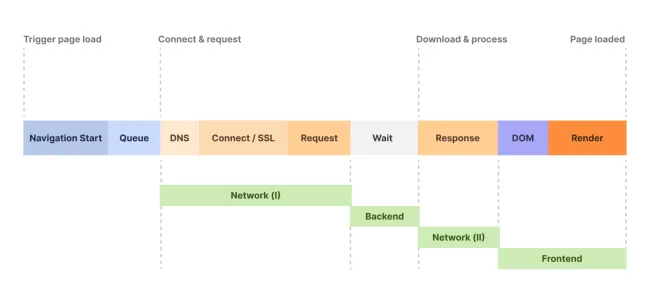
User clicks a link to your website. The visitor’s browser checks the IP of your domain in DNS, then sends the request for the page to the server. If the site uses SSL, the client and server negotiate a secure connection before the request is completed.
The server builds the HTML. The server receives the request and processes the website code. The database and file system are queried for all required elements and the HTML page is compiled. When the HTML is created, the server sends it back to the browser.
The browser reads the HTML and requests all elements. The browser receives the HTML code, reads the code and sees that it needs more elements (CSS files, fonts, images, JavaScript files). They can come from the same server or from other servers, in which case they require new DNS queries and SSL connections.
The browser starts building the page. While still collecting the elements, the browser starts building the page and displays a first version of the page. It’s called First Contentful Paint (FCP) and it’s an important metric. Because the page hasn’t finished loading, the user can’t interact with it yet.
The browser prepares the page for interaction. Several elements on the page must be gathered before the user can start interacting with the page, clicking or scrolling.
The page is ready to use. When all the elements have loaded and all the scripts have completed their configuration tasks, the page is finally ready to use. Our goal when optimising is to reach “ready to use” in the shortest possible time.
Time is of the essence
The loading of a web page can be broken down into three main components. The phrase “site loading speed” is shorthand; what we’re really optimising is time, how long each operation takes.
- Server response time. This is where the server works, running the site’s PHP code. If this first request is slow, all other steps in viewing the web page will be delayed.
- Data transfer time. The time required to transport the elements that make up the page from the server (or servers) to the browser. It depends on the amount of data and the distance it has to travel.
- Page rendering time. Influenced by the quality and complexity of the code to be interpreted, the number of elements and their size, as well as the speed of the device the browser is running on.
How to improve server response time
This is where the server works, processing the PHP code. The objective is to give the server as little work as possible. Or give the work as much server as possible. Ideally both.
Full page cache
Install a WordPress caching plugin or talk to your hosting provider about server-level caching or help with edge caching integration.
Better hosting
Shared web hosting cannot guarantee constant performance. If performance is critical for you, try a managed WordPress hosting or managed WooCommerce hosting solution.
Better plugins
Test the resource usage of WordPress plugins; check if there are plugins that make non-cacheable requests; replace them with better ones.
Database optimisation
Clean up orphaned meta_keys from the wp_postmeta table; clean entries with autoload:yes from the wp_options table; clean old plugin and theme entries; delete expired transients; change table engine to INNODB.
→ Deep dive: How to clean up your WordPress database.
WordPress settings
Disable trackbacks, pingbacks, emojis, embeds; disable or limit revisions; set regular trash cleaning; disable or modify the heartbeat API; disable xml-rpc if not needed; set up a server cronjob.
Better themes
Test the resource usage of your active WordPress theme and, if there are problems, replace it with a lighter theme.
How to improve data transfer time
The objective is to reduce the amount of data that needs to be transferred from the server to the browser, and to reduce the distance over which the data is transferred.
Optimise images
Don’t use higher resolutions than necessary; use the correct format (jpg, png, svg, webp) for each scenario; clean the server of unused images.
→ Deep dive: How to optimise your images.
Optimise fonts
Use only one font, maximum two (one for headings, one for body). Serve font files from your own server, or use system fonts.
Optimise CSS & JS
Remove useless CSS & JS, concatenate them, minify them. The goal is to have fewer and smaller CSS and JS files.
Use a CDN
Several options: Cloudflare (free), Quic.cloud, BunnyCDN, KeyCDN, AWS CloudFront, Google Cloud CDN, or Fastly.
How to improve page rendering time
This is where the browser on the visitor’s device works. We can’t control the speed of their internet connection or the computing power of their device, so we can only give that browser less work.
Reduce DOM complexity
Reduce DOM complexity by using native Gutenberg blocks to build pages instead of page builder plugins.
Better CSS
Reduce CSS complexity, remove syntax errors, reduce the use of @import and !important, remove duplicate or redundant selectors and properties.
Reduce JavaScript
The more JS you have on your site, the harder it will be to get a fast render time. Remove what you can, defer and delay what you cannot.
Prioritise above the fold
Use an optimisation plugin like FlyingPress to optimise the rendering of the above-the-fold section.
Deep dives
Until then, see the Performance category for related articles.