Managing a service
The Services area in the Kiravo client area contains the hosting plans attached to your account. Use it to check a service’s status and billing information, open its control panel, renew it, or change its account settings.
The client area manages the service contract. Website files, databases, email, domains, security, and backups live in the separate hosting control panel.
Find a service
Section titled “Find a service”- Sign in to the Kiravo client area.
- Open Services in the left sidebar and choose the relevant service category.
- Use the All, Active, and Cancelled tabs to narrow the list. Use Filter data when you need to search a longer list.
- Check the service row, then click its name, identifier, or arrow to open Service Details.
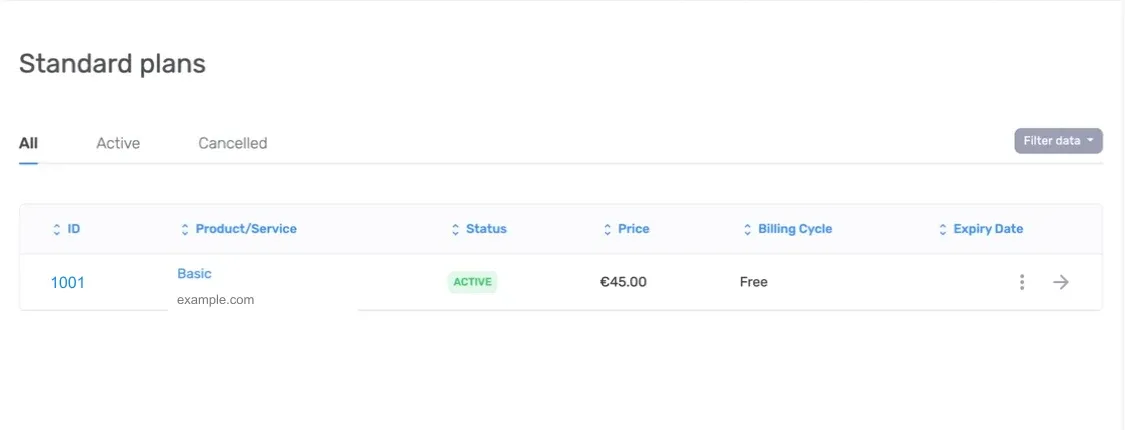
The services table can include these columns:
- ID identifies the service when you contact support.
- Product/Service shows the plan label and its associated domain.
- Status shows whether the service is currently available.
- Price and Billing Cycle show the recurring charge and renewal interval.
- Expiry Date shows the end of the current service period.
An Active service can provide its normal management actions. A cancelled, terminated, or otherwise inactive service may remain in the history without providing control-panel access. The status shown in the client area is the source of truth for that service.
Use the Service Details page
Section titled “Use the Service Details page”The top of the page shows the plan name, status, and associated domain. The details panel shows information such as the registration date, billing cycle, and auto-renew setting.
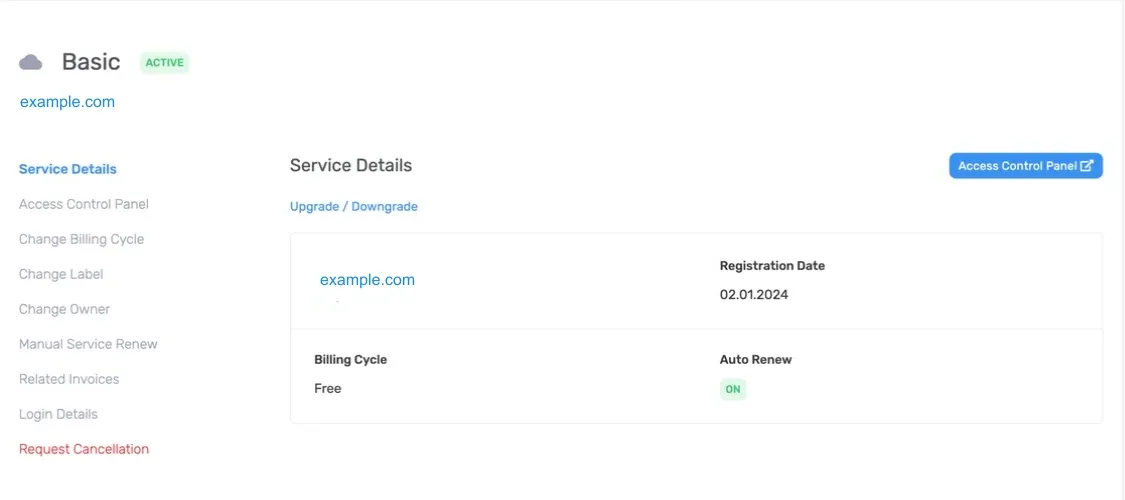
The actions available for an active service can include:
- Access Control Panel opens the separate hosting control panel through single sign-on.
- Upgrade / Downgrade changes the plan or its resources.
- Change Billing Cycle changes how often the service renews.
- Change Label gives the service a name that is easier to recognize.
- Change Owner transfers the service to another eligible contact or account.
- Manual Service Renew creates an early renewal when the service supports it.
- Related Invoices lists invoices associated with the service.
- Login Details shows credentials supplied with the service, when available.
- Request Cancellation starts the cancellation process.
The exact actions depend on the product and its current status. If an expected action is missing from an active service, open a support ticket and include the service ID. Do not include passwords or single-sign-on links.